CronMon
Does cron run when a Mac is asleep?
The answer
cron does not run jobs while the Mac is asleep, and it does not run them late when the Mac wakes. A cron job missed while the laptop was closed is gone: a line scheduled for 03:00 on a Mac that slept from midnight to eight does not happen that day, and nothing records that it was skipped.
To see whether the Mac was asleep at the time, read the power log:
pmset -g log | grep -E ' (Sleep|Wake|DarkWake) ' | tail -20Each line carries a timestamp and the reason. A Sleep entry before 03:00 with the next Wake after it is the whole explanation. If the Mac was awake and the job still did not run, the cause is something else; start with crontab is not running on macOS.
Fix 1: move the job to launchd
launchd's StartCalendarInterval does catch up. man 5 launchd.plist says so in as many words: "Unlike cron which skips job invocations when the computer is asleep, launchd will start the job the next time the computer wakes up. If multiple intervals transpire before the computer is woken, those events will be coalesced into one event upon wake from sleep."
So a 03:00 job on a closed laptop runs once when you open it in the morning, however many nights it slept through. Save this as ~/Library/LaunchAgents/com.example.nightly.plist:
<?xml version="1.0" encoding="UTF-8"?>
<!DOCTYPE plist PUBLIC "-//Apple//DTD PLIST 1.0//EN"
  "http://www.apple.com/DTDs/PropertyList-1.0.dtd">
<plist version="1.0">
<dict>
  <key>Label</key>
  <string>com.example.nightly</string>
  <key>ProgramArguments</key>
  <array>
    <string>/bin/sh</string>
    <string>/Users/you/bin/nightly.sh</string>
  </array>
  <key>StartCalendarInterval</key>
  <dict>
    <key>Hour</key><integer>3</integer>
    <key>Minute</key><integer>0</integer>
  </dict>
</dict>
</plist>
launchctl bootstrap gui/$UID ~/Library/LaunchAgents/com.example.nightly.plistThen delete the crontab line, or the job runs twice on the nights the Mac is awake. launchd StartCalendarInterval examples has the weekday and several-times-a-day shapes, and cron vs launchd on macOS compares the two on everything else.
Two limits. The man page's promise is about sleep: a Mac that was shut down at the scheduled time does not run the job at the next boot. And it belongs to StartCalendarInterval only. Of StartInterval the same page says: "If the system is asleep during the time of the next scheduled interval firing, that interval will be missed due to shortcomings in kqueue(3)."
Fix 2: wake the Mac before the job
If the job has to stay in cron, or has to happen at 03:00 rather than at breakfast, schedule a wake shortly before it:
sudo pmset repeat wakeorpoweron MTWRFSU 02:55:00pmset -g sched shows the repeating event, and sudo pmset repeat cancel removes it.
pmset repeat sets a daily or weekly power event. wakeorpoweron wakes a sleeping Mac or starts one that is off, the weekdays are any subset of MTWRFSU, the time is 24-hour HH:mm:ss, and changing it needs root. man pmset adds that you may have only one pair of repeating events, one power on and one power off, so a new repeating wake takes the place of one you already had. Check pmset -g sched first.
The man page does not say how long the Mac stays awake after a scheduled wake, so check rather than assume. The morning after, run the pmset -g log line above: if the Mac went back to sleep before 03:00, move the wake closer to the job. Once the job has started, it can hold the Mac awake itself:
0 3 * * * /usr/bin/caffeinate -i /Users/you/bin/nightly.shcaffeinate with a command keeps the system from idle sleeping for as long as that command runs, then lets go.
Fix 3: keep the Mac awake for the window
No idle sleep for the next four hours:
caffeinate -i -t 14400Or no system sleep until you press Ctrl-C:
caffeinate -sRun either before you walk away and cron fires as usual. The man page is specific about the limits: -i prevents idle sleep, and -s "is valid only when system is running on AC power". Neither is documented to hold a laptop awake once you close the lid, so test that on your own machine before a backup depends on it.
What does not help
Power Nap. It lets macOS do some of its own background work during sleep; it does not run your crontab. Writing the line differently does not help either: @daily is 0 0 * * *, and a sleeping Mac misses midnight the same way.
Or see which of your jobs are the ones at risk
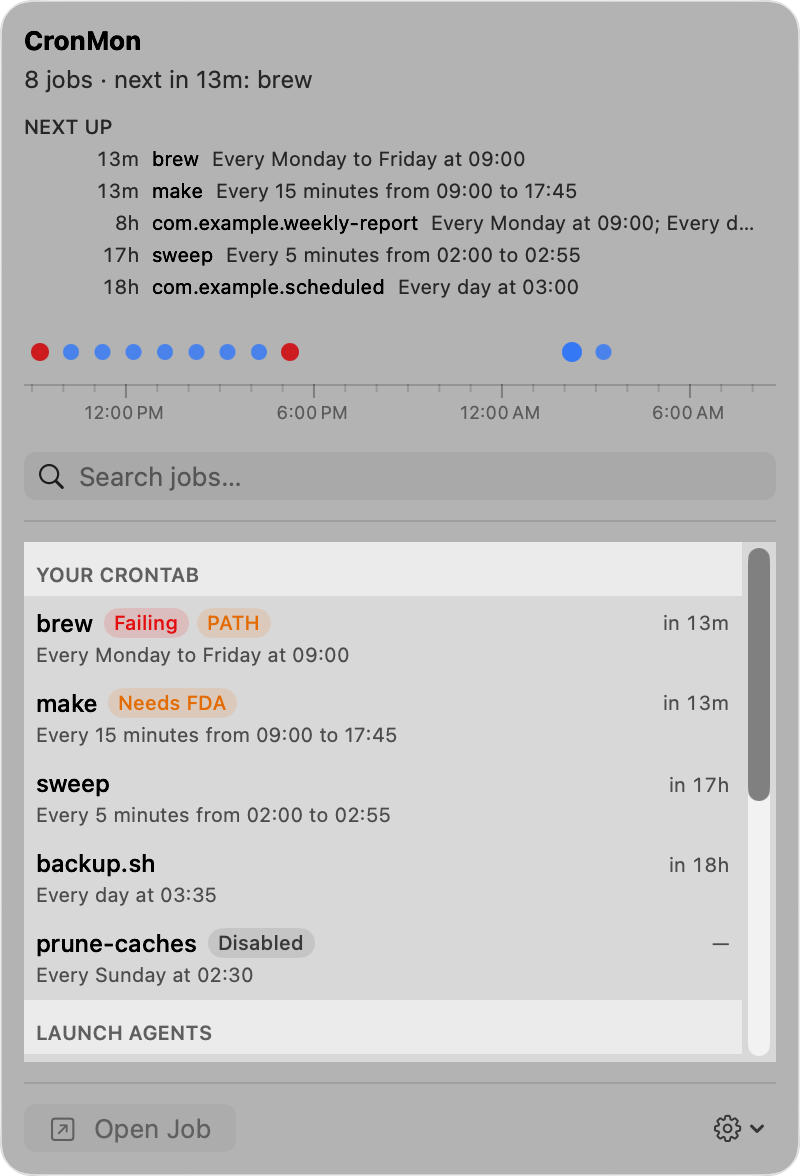
CronMon shows your crontab and your scheduled launchd agents together: the next runs of both in one list, each schedule in plain English, and a dot per run on a timeline. The jobs due at 03:00 are easy to pick out, and so is which scheduler owns each one. For a launch agent it shows what launchd reports: run count, last run and last exit code. For a cron job it lists the runs it saw happen while CronMon was running, which is the only record of cron runs a Mac keeps.