CronMon
Crontab syntax explained, with examples
The line
A crontab line is five time fields, then the command. cron checks every line once a minute and runs the command when all five match the Mac's local time:
minute  hour  day-of-month  month  day-of-week  command
30 7 * * 1-5 /Users/you/bin/report.sh| Field | Allowed values |
|---|---|
| minute | 0-59 |
| hour | 0-23 |
| day of month | 1-31 |
| month | 1-12, or jan–dec |
| day of week | 0-7, where 0 and 7 are both Sunday, or sun–sat |
The fields are separated by spaces or tabs. Everything after the fifth is the command, run by /bin/sh. There is no seconds field and no year field. If you have not added a job before, how to add a cron job on a Mac covers crontab -e and testing the line.
The four operators
| Write | Means | Example |
|---|---|---|
| * | every value | * in hour: every hour |
| a,b,c | a list | 0,30 in minute: on the hour and half past |
| a-b | an inclusive range | 9-17 in hour: 09:00 to 17:59 |
| */n, a-b/n | every nth value | */15 in minute: :00, :15, :30, :45 |
They combine: 0-4,8-12 is a valid list of ranges, and 1-9/2 is 1, 3, 5, 7, 9. Names work for single months and days, case-insensitive, but the manual says "Ranges or lists of names are not allowed", so write 1-5 rather than mon-fri.
Examples
| When | Line |
|---|---|
| Every minute | * * * * * |
| Every 5 minutes | */5 * * * * |
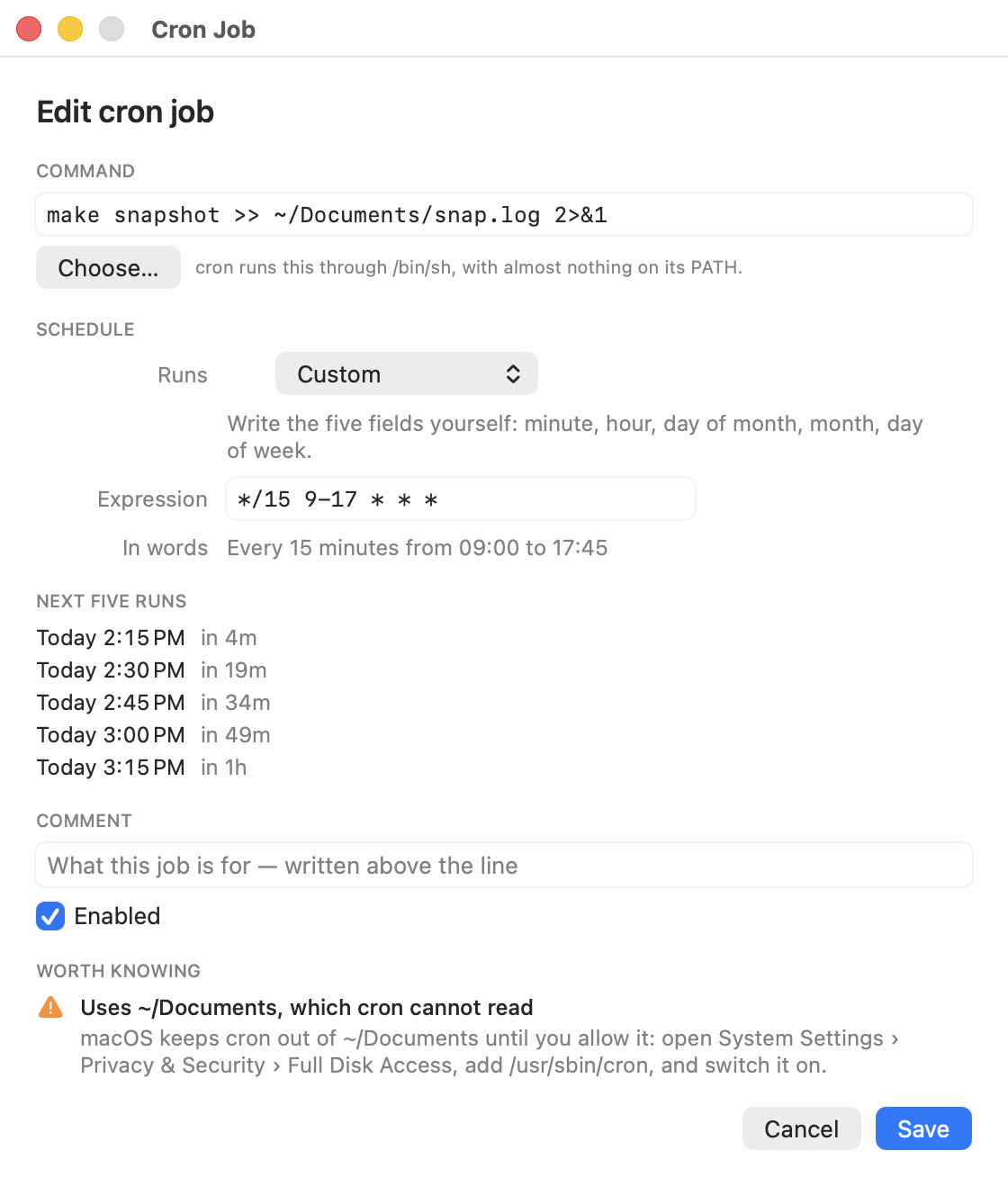
| Every 15 minutes, 09:00–17:45, weekdays | */15 9-17 * * 1-5 |
| Every hour, at half past | 30 * * * * |
| Every 2 hours, on the hour | 0 */2 * * * |
| Twice a day, 09:00 and 17:00 | 0 9,17 * * * |
| Every day at 07:30 | 30 7 * * * |
| Weekdays at 09:00 | 0 9 * * 1-5 |
| Weekends at 10:00 | 0 10 * * 0,6 |
| Every Sunday at 02:00 | 0 2 * * 0 |
| First of the month at 04:30 | 30 4 1 * * |
| The 1st and 15th at midnight | 0 0 1,15 * * |
| Quarterly: 1 Jan, Apr, Jul, Oct | 0 0 1 */3 * |
| Once a year, 1 January | 0 0 1 1 * |
A few of the common ones have names that replace all five fields: @hourly, @daily (or @midnight), @weekly (Sunday at midnight), @monthly, @yearly (or @annually), and @reboot, which runs once when cron starts at boot.
Steps restart at the end of the field
A step counts from the start of the field and starts again at the top of the next one. */7 in the minute field is :00, :07 … :49, :56, and then :00 again four minutes later, not seven. In the hour field, */5 is 00:00, 05:00, 10:00, 15:00, 20:00, then a four-hour gap to midnight. Choose steps that divide 60 for minutes and 24 for hours if you want even gaps.
The day-of-month and day-of-week trap
When both day fields are restricted, cron runs the job when either matches. The manual's own example: 30 4 1,15 * 5 runs at 04:30 on the 1st, on the 15th, and on every Friday. So 0 9 1-7 * 1 is not "the first Monday"; it is the first seven days of the month and every Monday as well.
One detail the manual leaves out: Vixie cron treats a day field as unrestricted if it starts with *. So */2 in the day-of-month field switches the rule from "either" to "both", and 0 9 */2 * 1 means Mondays that fall on an odd-numbered date.
What cron cannot write, and the workarounds
The first Monday of the month. Schedule the first seven days and let the command check the weekday. date +%u prints 1 for Monday, and the % needs a backslash in a crontab (why):
0 9 1-7 * * [ "$(date +\%u)" = 1 ] && /Users/you/bin/report.shThe last day of the month. Run on the 28th to the 31st and check whether tomorrow is the 1st. macOS's date is the BSD one, so it is -v+1d, not the GNU -d tomorrow you will find in Linux answers:
0 23 28-31 * * [ "$(date -v+1d +\%d)" = 01 ] && /Users/you/bin/month-end.shEvery 90 minutes. Two lines, one for the whole hours and one for the half hours:
0 */3 * * *     /Users/you/bin/job.sh
30 1-22/3 * * * /Users/you/bin/job.sh
Every 30 seconds. cron's smallest unit is a minute. Two lines, one of them waiting half of it:
* * * * * /Users/you/bin/job.sh
* * * * * sleep 30; /Users/you/bin/job.sh
Anything more intricate belongs in a launchd agent or in the script. launchd StartCalendarInterval examples has the property-list versions of the common shapes.
The rest of the line
- Comments start with # and must be on their own line. A # after a command is part of the command.
- Environment lines such as PATH=…, MAILTO=… or SHELL=… apply to the jobs below them. A cron job's default PATH is only /usr/bin:/bin; cron: command not found is about that.
- Percent signs in the command end it unless escaped as \%.
- @AppleNotOnBattery, a macOS-only prefix on the command, tells cron to skip the run while the Mac is on battery: 0 * * * * @AppleNotOnBattery /Users/you/bin/sync.sh.
Time zones and daylight saving
cron schedules in the Mac's own time zone, the one in System Settings. Apple's cron has no CRON_TZ, and a TZ= line in the crontab changes the job's environment, not when it runs. On the nights the clocks change, the manual's advice is not to schedule anything in the hour that is skipped or repeated; in the US and most of Europe that means avoiding roughly 01:00 to 03:00.
Checking a line before you trust it
crontab -e refuses a line it cannot parse and says errors in crontab file, can't install. It says nothing about a line that parses but means something else, such as the day trap above. And a Mac that is asleep at the scheduled minute skips the run; does cron run when a Mac is asleep? has the fixes.
Or read the schedule back in plain English
CronMon's editor puts the schedule in plain English and the next five runs under the expression while you type, so 0 9 1-7 * 1 reads back as what cron will actually do before you save it. It warns about a schedule that fires on no date in the next five years, and about an unescaped %. The shape picker only offers minute steps that divide 60, for the reason above.