CronMon
How to add a cron job on a Mac
The short version
EDITOR=nano crontab -eAdd one line, save (^O, Return, then ^X in nano), and cron picks it up immediately — no reload, no launchctl:
0 9 * * 1-5 /usr/local/bin/standup.sh >> /tmp/standup.log 2>&1That runs standup.sh at 09:00, Monday to Friday. crontab -l prints the crontab back so you can see it is installed. Do not edit /usr/lib/cron/tabs/<user> directly, and do not use sudo: that writes root's crontab, not yours.
If crontab -e drops you into vi and you cannot get out, press Esc and type :q! — then see the editor guide.
The five fields
┌───────────── minute        0-59
│ ┌─────────── hour          0-23
│ │ ┌───────── day of month  1-31
│ │ │ ┌─────── month         1-12  (or jan-dec)
│ │ │ │ ┌───── day of week   0-6   (0 = Sunday, or sun-sat)
│ │ │ │ │
0 9 * * 1-5  /usr/local/bin/standup.sh
A * means "every". A list is 1,15, a range is 9-17, and a step is */15 — every fifteenth value. Everything after the fifth field is the command, handed to /bin/sh as written.
Two worked examples:
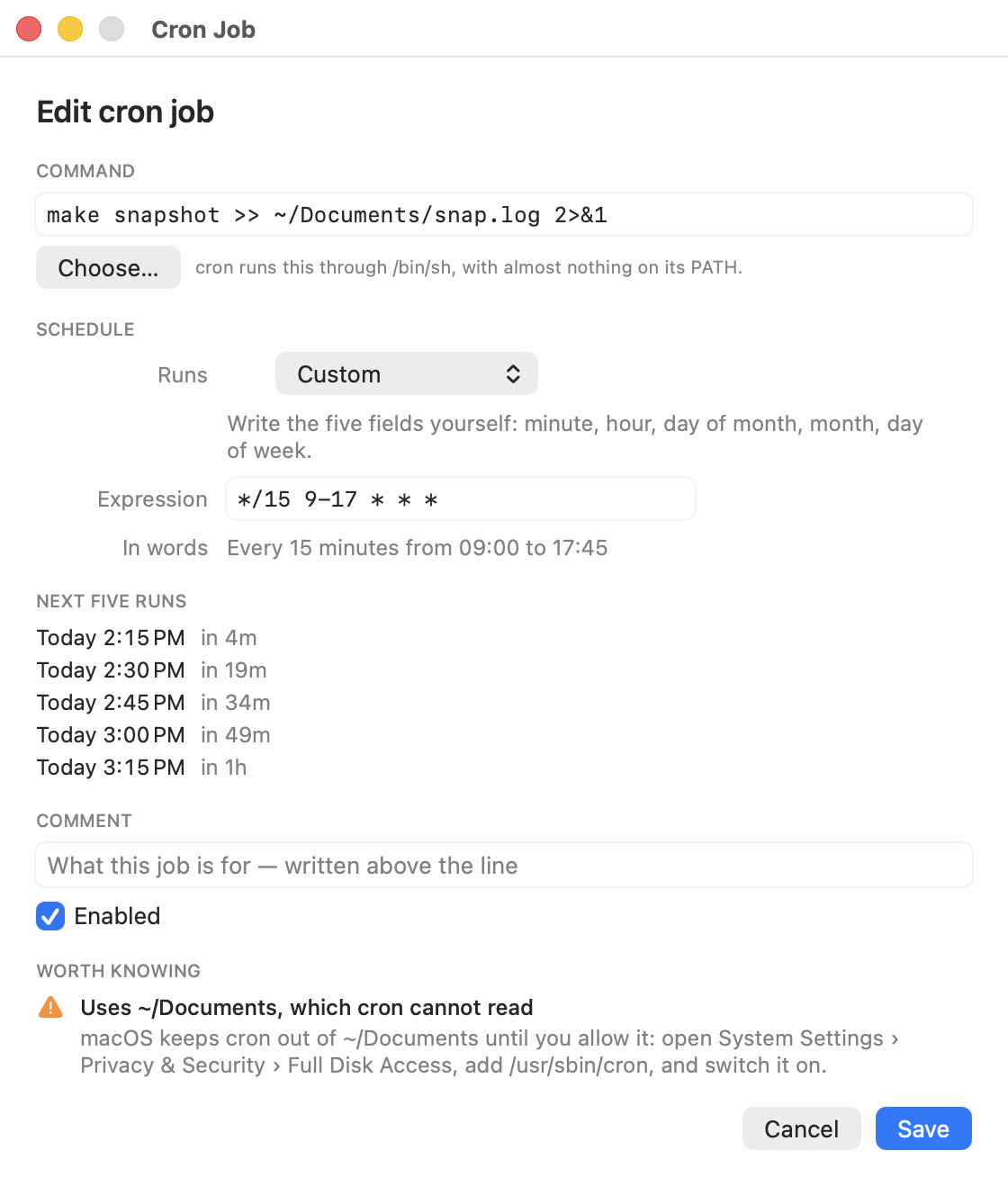
*/15 9-17 * * *  /opt/homebrew/bin/rsync -a ~/work /Volumes/Backup/work
30 4 1 * *       /Users/me/bin/monthly-report.sh
The first is every fifteen minutes between 09:00 and 17:45, every day. The second is 04:30 on the first of every month. The trap in the third field: 30 4 1 * 1 is not "the first Monday" — when both the day-of-month and day-of-week fields are restricted, cron fires when either matches, so that line runs on the 1st and on every Monday.
There are shorthands too: @daily, @hourly, @weekly, @monthly and @reboot, each replacing all five fields.
Escape any percent sign
cron reads an unescaped % as the end of the command, and turns the rest into text it pipes to the job's standard input. Quotes do not help — cron is not a shell. So this does not do what it looks like:
0 2 * * * /usr/bin/tar -czf ~/backup-$(date +%Y%m%d).tgz ~/srcPut a backslash in front of each % instead:
0 2 * * * /usr/bin/tar -czf ~/backup-$(date +\%Y\%m\%d).tgz ~/srcThis one is worth knowing because it fails silently: the job runs, and writes a file with a truncated name.
Give it a PATH
A cron job runs with PATH=/usr/bin:/bin. Not your shell's PATH — nothing from /opt/homebrew/bin or /usr/local/bin. A line that works when you paste it into Terminal fails at 4am with "command not found". Two fixes, either is fine:
PATH=/opt/homebrew/bin:/usr/local/bin:/usr/bin:/bin

0 9 * * 1-5 python3 ~/bin/report.py
A PATH= line at the top of the crontab applies to every job below it. Or skip it and write the full path to every program: /opt/homebrew/bin/python3. Run which python3 to find out what the full path is.
The same goes for anything else your shell profile sets. cron does not read ~/.zshrc, so environment variables your script expects have to be set in the crontab or in the script itself.
Decide where the output goes
Anything the job prints is mailed to your local mailbox at /var/mail/<user> — a plain text file no Mail.app account reads. Send it somewhere you will look instead. MAILTO mails it to a real address; write MAILTO="" instead to throw it away:
[email protected]

0 9 * * 1-5 ~/bin/report.sh >> ~/report.log 2>&1
The >> … 2>&1 redirect is the useful habit: the job's own log, with the errors in it, in a file you chose. Without it your only record is the mailbox.
Prove it actually fires
Do not wait until 4am to find out. Add a throwaway line a couple of minutes ahead — say it is 14:32 now:
34 14 * * * /bin/date >> /tmp/cron-test.log 2>&1Save, wait for the minute to pass, then cat /tmp/cron-test.log. A timestamp means cron is running, found your command, and could write the file; take the line out again. Nothing at all means the job never fired — check crontab -l to be sure the line is installed, and mail or cat /var/mail/$(whoami) for what it tried to say. There is nothing in the unified log to look at: cron writes no entries to it at any level.
One more macOS-only trap: if the job touches ~/Desktop, ~/Documents, ~/Downloads or an external volume, it fails with "Operation not permitted" until /usr/sbin/cron has Full Disk Access. That guide has the six steps.
Or write the line without writing the line
CronMon adds a cron job from a form: pick daily, weekly, every N minutes or any other shape and it writes the five fields for you, or type the expression and watch the controls follow. The schedule in plain English and the next five runs sit under it while you type, along with the warnings above — a command that is not on cron's PATH, a job that needs Full Disk Access, an unescaped %, output going to mail unread. It backs up your whole crontab before every save and reads it back to check; every line you did not touch comes back byte for byte.